Cluster Control Center
⚠ Cluster control is only available for commercial versions.
pbottleRPA Cluster Management System allows end users to batch manage their task results through a browser without touching specific task flows.
The pbottleRPA (Robotic Process Automation) cluster control center is the core management and scheduling hub for all RPA batch tasks.
In a large-scale automated task system, the RPA cluster control center can assign automation tasks to different robots based on the business needs of various departments, while monitoring the working status of robots in real-time.
If a robot encounters a fault or anomaly, the control center can promptly adjust task allocation to ensure business continuity.
Through analysis of operational data, enterprises can identify bottlenecks and optimization points in their processes, further improving RPA efficiency and effectiveness. It acts like a command center, ensuring the RPA robot cluster runs efficiently and orderly, providing strong support for the enterprise's digital transformation.
System Architecture
Supports deployment on both Linux & Windows systems. One-time device authorization binding.
Web management backend, convenient for LAN and network users to log in and use.
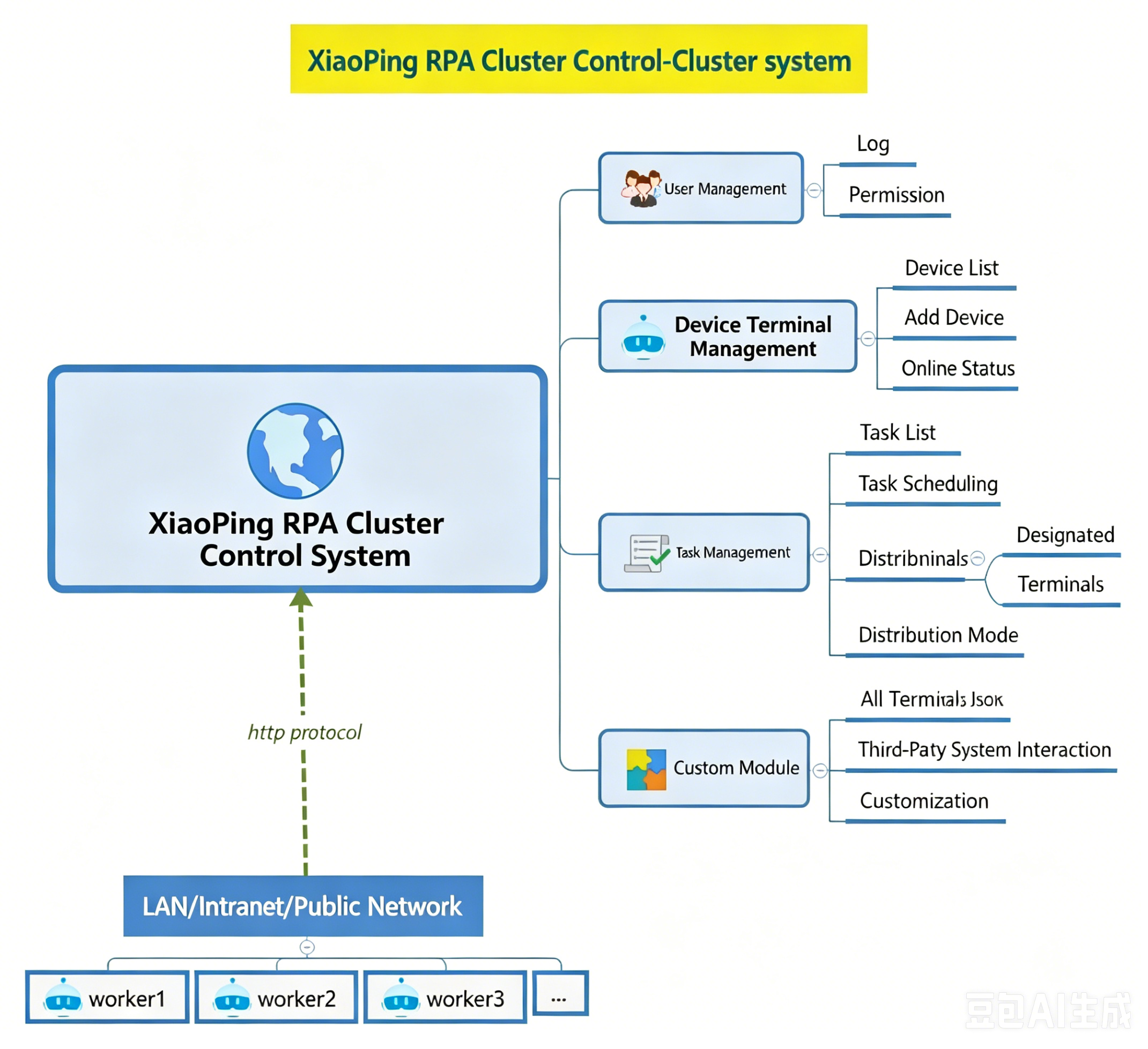
User Management
Allows new users to register by filling in necessary information such as username and password. Provides login functionality to verify user identity and grant corresponding permissions. Supports password modification.
User operation logs can record when employees logged into the system, what business data they modified, etc. If certain data was incorrectly modified or there were unauthorized operations, the operation logs can quickly identify the responsible person.
Device Terminal Management
Terminal information management, recording basic information of each device terminal in detail, such as device info, name, addition time, etc. Facilitates clear identification and management of a large number of devices.
Connection management, monitoring and managing the connection status between device terminals and the control center to ensure stable communication. Handle connection anomalies promptly to ensure smooth task assignment and data transmission.
RPA terminal status monitoring, continuously monitoring device terminal performance indicators such as offline, connected, running, etc. Based on performance status, perform resource allocation and optimization.
Task Management
When there are a large number of tasks to be executed, the control center can efficiently distribute tasks based on the real-time status of each node. Through continuous monitoring of task status and progress, ensure each worker RPA robot achieves maximum efficiency. Task creation and definition, allowing users to conveniently create new RPA tasks, specifying task target parameters, flow start time, and other requirements.
Task assignment, reasonably assigning tasks to suitable nodes for execution based on the status and capabilities of each node in the cluster. Consider load balancing and other factors to improve overall efficiency. Distribution modes include: All Terminals + Specified Terminals. Task parameter settings, setting specific parameters for each task to ensure the terminal RPA client can receive and execute automation flow tasks according to the parameter configuration.
Task history records, retaining historical information of tasks including execution time, results, etc., for traceability and review.
Custom Task Types
Based on the BS architecture web management system, a dedicated flow task management system can be quickly customized for clients.
Customize task types with dedicated input/output file formats that match business scenarios.
pbottleRPA Cluster System Documentation
Supports private cloud deployment on Linux & Windows systems for ultimate data security.
One-time device authorization binding, unlimited number of terminals.
System preview:

Terminal Configuration
Configuration steps:
- Open the pbottleRPA terminal.
- Settings (System Settings).
- Advanced.
- Cluster control center service address, e.g.:
http://pbottleRPA_cluster_test.com:39088/api/query - Cluster control center communication frequency, e.g.:
5, 0: disabled.
Result: Cluster mode displays green light.
Flow Log Upload
Log upload requires waiting for the business script to finish execution before the terminal actively uploads. There may be a delay.
Add the upload script at the beginning of the flow.
pbottleRPA.delaySet('./[Enterprise Edition] Cluster Control Center Log Upload.js');