Browser Enhancement - Web Application
⚠ The browser plugin is just a quick shortcut for web browser page operations, it is not mandatory. Desktop application operation rules can also be used to operate web browser applications.
Requires prior installation of the pbottleRPA browser extension. Installation instructions:
https://officetool.online/a-313.html
Basic usage: pbottleRPA.browserCMD.xxx()
Refer to demo examples starting with "web enhancement".
Element Selector
pbottleRPA web enhancement basically follows the design rules of the widely used jQuery selector. Refer to the jQuery selector documentation.
https://api.jquery.com/category/selectors/
Advantages over xpath and other solutions:
- Low learning curve, rules consistent with the browser's native document.querySelector method
- Strong compatibility, supports virtual DOM front-end frameworks such as Vue, React, etc.
- Rich and powerful pseudo-class support for advanced selection and positioning
pbottleRPA.browserCMD_click('button:contains(Login)')Element Selector Testing Tool
The new version of pbottleRPA includes an element selector testing feature. This feature helps users quickly locate and select HTML elements in complex web pages.
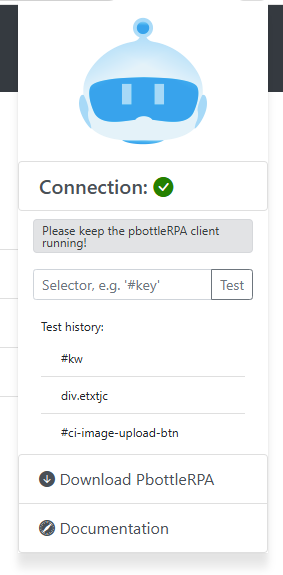
V2025.2 New: Selected element background flash feature to help users view element positions.
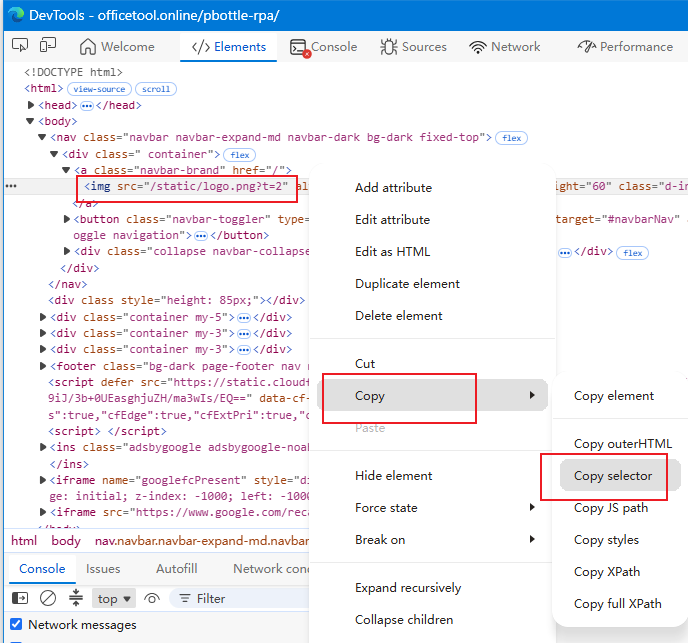
Quick copy element selector steps:
- Hover the mouse over the target element on the page, press F12 or right-click "Inspect Element"
- On the target element's code block, right-click to open the copy menu
- Select "Copy selector"
alert Dialog
browserCMD_alert()
Browser enhanced command. Requires pbottleRPA browser extension.
Alert dialog.
@param {*} msg text content to display
@returns none
url Get/Set Current URL
browserCMD_url()
Browser enhanced command. Requires pbottleRPA browser extension.
@param {string} urlStr redirect current page to a new URL, default empty to get current URL. [Effective for pbottleRPA browser extension V2023.8+]
@returns {string} returns current browser URL or ok
click Click
browserCMD_click()
Browser enhanced command. Requires pbottleRPA browser extension.
Simulate click. Refer to jQuery click() method, changed to browser native click() with auto-focus.
@param {string} selector element selector. If multiple elements match, only the first element's click event is triggered.
@param {object} options click options optional e.g.: { bubbles: false, ctrlKey: true} https://developer.mozilla.org/en-US/docs/Web/API/MouseEvent/MouseEvent
@returns
dblclick Double Click
Browser enhanced command. Requires pbottleRPA browser extension. Supported from V2026.2+.
Simulate double click. Refer to jQuery dblclick() method, changed to browser native click() with auto-focus.
@param {string} selector element selector. If multiple elements match, only the first element's click event is triggered.
@param {object} options click options optional e.g.: { bubbles: false, ctrlKey: true} https://developer.mozilla.org/en-US/docs/Web/API/MouseEvent/MouseEvent
@returns
closeTab Close Tab
browserCMD_closeTab('current'|'other') Supported from V2025.4+.
Browser enhanced command. Requires pbottleRPA browser extension.
Close browser tab. Use pbottleRPA.openURL() to open new tabs.
@param {string} close type 'current': default close current tab; 'other': close other tabs
@returns {string} normally returns 'ok'
count Element Count
browserCMD_count()
Browser enhanced command. Requires pbottleRPA browser extension.
Element count. Refer to jQuery selector.
@param {string} selector element selector
@returns {number} returns the count of selected elements, the optimal result is 1
hide Hide Element
browserCMD_hide()
Browser enhanced command. Requires pbottleRPA browser extension.
Hide. Refer to jQuery hide() method.
@param {*} selector element selector
@returns
show Show Element
browserCMD_show()
Browser enhanced command. Requires pbottleRPA browser extension.
Show. Refer to jQuery show() method.
@param {*} selector element selector
@returns
offset Get Element Position
Browser enhanced command. Requires pbottleRPA browser extension. Effective for versions >= 2024.0.
Get element position relative to browser document top-left. Refer to jQuery offset() method.
@param {string} selector element selector
@returns {} returns JSON: {"top":100,"left":100} Pixel values are software pixels, not hardware pixels.
remove Remove Element
browserCMD_remove()
Browser enhanced command. Requires pbottleRPA browser extension.
Remove element. Refer to jQuery remove() method.
@param {*} selector element selector
text Get/Set Text
browserCMD_text
Browser enhanced command. Requires pbottleRPA browser extension.
Get or set text. Refer to jQuery text() method.
@param {*} selector element selector
@param {*} content
@returns
html Set/Get Code
browserCMD_html()
Browser enhanced command. Requires pbottleRPA browser extension.
Get or set HTML. Refer to jQuery html() method.
@param {*} selector element selector
@param {*} content
@returns
val Get/Set Value
browserCMD_val()
Browser enhanced command. Requires pbottleRPA browser extension.
Get or set value for input, select, etc. Refer to jQuery val() method.
@param {*} selector element selector
@param {*} content
@returns
cookie Get/Set Small Storage
browserCMD_cookie()
Browser enhanced command. Requires pbottleRPA browser extension.
Get or set the current site's cookie.
@param {*} cName cookie name
@param {*} cValue cookie value, leave empty to get the cookie value
@param {*} expDays cookie expiration time in days, leave empty for session cookie
@returns cookie value
css Get/Set Style
browserCMD_css()
Browser enhanced command. Requires pbottleRPA browser extension.
Get or set CSS style. Refer to jQuery css() method.
@param {*} selector element selector
@param {*} propertyname
@param {*} value
@returns
attr Get/Set Attribute
Browser enhanced command. Requires pbottleRPA browser extension.
Get or set attr attribute. Refer to jQuery attr() method.
@param {*} selector element selector
@param {*} attribute name
@param {*} value
prop Get/Set Prop
Browser enhanced command. Requires pbottleRPA browser extension.
Get or set prop attribute. Refer to jQuery prop() method.
@param {*} selector element selector
@param {*} attribute name
@param {*} value
fetch Network Request
Browser enhanced command. Requires pbottleRPA browser extension. Supported from V2026.2+.
Fetch request, initiates an AJAX request from the current page and returns the response. https://developer.mozilla.org/en-US/docs/Web/API/Fetch_API/Using_Fetch
Default 20 seconds timeout.
@param {string} fetch_url URL
@param {object} options request parameters
@returns {string} response result
waitPageReady Monitor Page Load Complete
Browser enhanced command. Requires pbottleRPA browser extension. Supported from V2026.2+.
Wait for page to finish loading, returns the page URL.
Default 20 seconds timeout.
@param {string} readyURL the URL expected after page loading completes
@param {number} timeout timeout in seconds
@returns {string} returns current browser URL or error exit
Batch Scrape Web Content
When the selector returns multiple elements, all content is returned at once in JSON array format. Note: Supported from V2025.3+.
Batch scraping currently supports the following methods:
text()
html()
val()
attr()
See demo: WEB Enhancement - Batch Data Scraping Demo.js